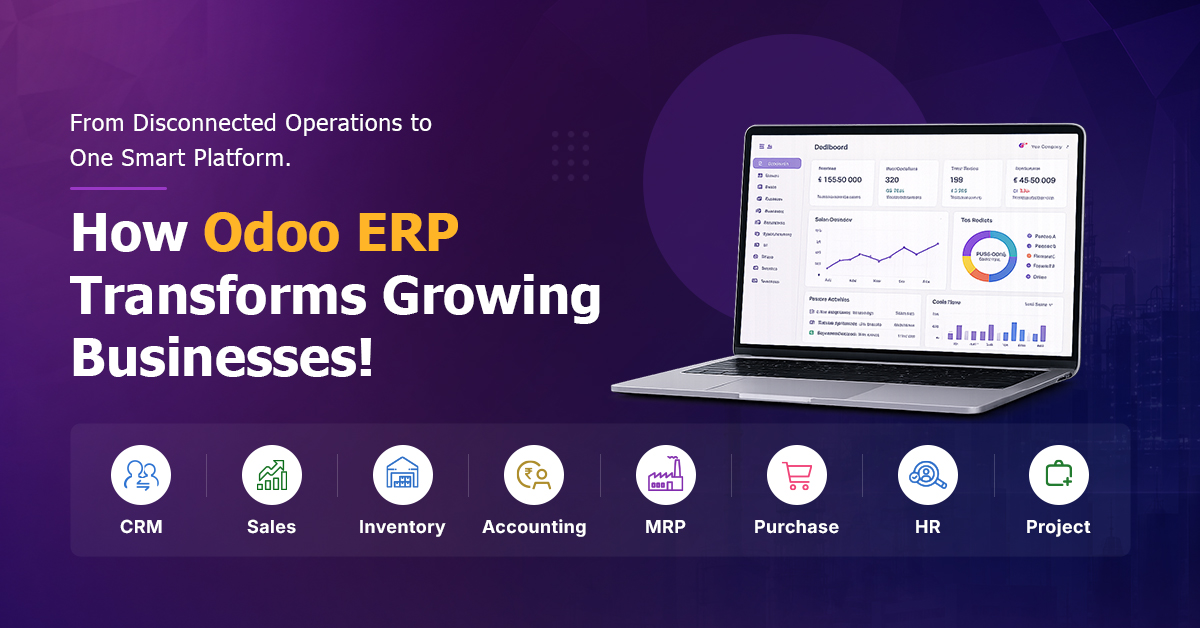
As businesses grow, managing different departments becomes increasingly complex. Sales teams may use one application, inventory may be managed through spreadsheets, purchase approvals may happen over email and finance teams may depend on separate accounting software.
Although these tools may handle individual activities, they often fail to provide a single and accurate view of business operations. Odoo ERP helps solve this challenge by bringing important functions such as CRM, sales, purchasing, inventory, manufacturing, accounting, human resources, websites and eCommerce together on one connected platform.
With professional Odoo ERP Implementation Services, businesses can reduce manual work, improve coordination and gain greater control over their daily operations.
What Is Odoo ERP?
Odoo ERP is an integrated business management platform consisting of connected applications for managing different departments and business processes. ERP stands for Enterprise Resource Planning. It refers to a centralized software system that allows different departments to work with shared information rather than maintaining separate and disconnected records.
Odoo follows a modular structure. A business can begin with essential applications such as CRM, Sales, Purchase and Inventory and later introduce Manufacturing, Accounting, HR, Projects, Website or eCommerce applications.
This flexibility makes Odoo suitable for businesses that want to implement technology according to their current priorities and expand it as their requirements grow.
Why do Growing Businesses Need Odoo ERP?
Many businesses initially rely on spreadsheets, emails and basic departmental software. These tools may work when the organization is small, but they often become difficult to manage as the number of customers, employees, suppliers, products and locations increases.
Disconnected systems can create problems such as:
- Duplicate data entry
- Delayed approvals
- Inventory mismatches
- Inaccurate reports
- Limited production visibility
- Communication gaps between departments
- Difficulty tracking customer orders
- Dependence on manual follow-ups
Integrated Odoo ERP Solutions help departments exchange information through a common platform. For example, when the sales team confirms an order, the warehouse can check product availability. When stock is insufficient, purchasing or manufacturing activities can begin. After delivery, the finance team can generate an invoice using information already available in the system. This connected workflow improves visibility and reduces repeated manual work.
How Does Odoo Connect Different Departments?
The main advantage of Odoo is that its applications can work together. Consider a manufacturing company receiving an enquiry from a customer. The inquiry can be recorded in Odoo CRM. The sales team can then prepare a quotation and convert it into a sales order after receiving customer approval.
The system can check whether the required finished products are available in inventory. When production is necessary, a manufacturing order can be generated based on the appropriate bill of materials.
When raw materials are unavailable, the purchase team can initiate procurement. Once materials arrive, inventory records are updated, production can begin, finished products can be delivered and the finance team can generate the customer invoice. Instead of operating through separate applications, every department participates in one connected business process.
Important Odoo ERP Applications
CRM and Sales
Odoo CRM helps businesses organize customer enquiries, opportunities and follow-up activities.
Sales teams can use the system to:
- Record new leads
- Assign opportunities to sales representatives
- Track follow-up activities
- Prepare quotations
- Convert quotations into sales orders
- Monitor expected revenue
- Review sales performance
Connecting CRM and Sales allows customer information to move smoothly from the first enquiry to the confirmed order.
Purchase Management
The Purchase application helps businesses manage vendors, supplier quotations, purchase orders and procurement activities.
It can support organizations in:
- Maintaining supplier records
- Requesting supplier quotations
- Comparing commercial offers
- Creating purchase orders
- Tracking expected delivery dates
- Monitoring pending purchases
- Coordinating procurement with inventory requirements
This provides better control over purchasing and reduces unnecessary or delayed procurement.
Inventory and Warehouse Management:
Odoo Inventory helps businesses manage stock movements across one or multiple warehouses.
Depending on the business requirements, it can be configured to handle:
- Product quantities
- Warehouse locations
- Incoming materials
- Outgoing deliveries
- Internal stock transfers
- Batch and serial numbers
- Reordering rules
- Inventory adjustments
Real-time inventory information helps sales, purchase and production teams make better operational decisions.
Odoo ERP for Manufacturing
Odoo ERP for Manufacturing helps industrial businesses connect production planning with inventory, procurement, sales and finance.
Manufacturing organizations can use Odoo to manage:
- Bills of materials
- Manufacturing orders
- Work orders
- Raw-material consumption
- Production stages
- Work centres
- Subcontracting
- Finished-goods output
- Quality-related processes
- Equipment maintenance
When the Manufacturing application is connected with Inventory and Purchase, businesses can identify material shortages before production begins. For example, when a manufacturing order is created, the system can check whether the required raw materials are available. When materials are insufficient, procurement requirements can be generated according to the configured workflow. This connection helps reduce production delays and gives management better visibility into manufacturing activities.
Accounting and Finance
Odoo can help finance teams manage invoicing, vendor bills, payments, expenses and financial records.
A connected accounting system can support:
- Customer invoices
- Vendor bills
- Receivables
- Payables
- Expense records
- Payment follow-ups
- Bank reconciliation
- Financial reporting
Because accounting is connected with sales, purchasing and inventory, finance teams can access information without collecting it manually from different departments.
Human Resource Management
Odoo HR applications can help organizations maintain centralized workforce information.
Depending on the implementation scope, businesses can use Odoo for:
- Employee records
- Attendance management
- Leave management
- Recruitment
- Appraisals
- Expenses
- Employee documents
- Department structures
- Payroll-related processes
This reduces dependence on separate HR files and spreadsheets.
Website and eCommerce
Odoo also offers applications for websites, online stores, blogs, live chat and customer portals.
Businesses can use these applications to manage:
- Website enquiries
- Online products
- Customer orders
- Stock availability
- Online payments
- Delivery processes
- Customer communication
Because the website can be connected with Sales, Inventory and Accounting, online transactions can move directly into the internal business workflow.
What Are the Benefits of Odoo ERP?
Centralized Business Information
Odoo provides a shared system in which departments can access connected and updated information.
Improved Operational Visibility
Management can monitor sales, purchasing, stock, production and finance without waiting for manually prepared departmental reports.
Reduced Manual Work
Information entered during one stage of a process can be reused during the following stages, reducing repeated data entry.
Better Departmental Coordination
Sales, purchase, warehouse, production, finance and HR teams can work through connected workflows.
Flexible and Scalable Structure
Businesses can introduce applications according to their priorities and add more modules as operations grow.
Standardized Processes
Odoo can help establish structured workflows, approval responsibilities and consistent operating procedures.
Faster Decision-Making
Dashboards and connected reports can help management identify delays, shortages and pending activities earlier.
Which Industries Can Use Odoo ERP?
Odoo can be configured for different industries and business models.
Manufacturing
Manufacturing companies can connect raw materials, production orders, bills of materials, purchasing, inventory, sales and finance.
Distribution and Wholesale
Distributors can manage suppliers, warehouses, customer orders, deliveries, pricing and invoicing.
Retail
Retail businesses can connect sales transactions with inventory, customer records and financial activities.
Engineering and Project-Based Businesses
Engineering companies can manage projects, timesheets, purchasing, expenses, resources and customer billing.
Mining and Industrial Operations
Industrial businesses can configure Odoo for purchasing, stores, inventory, approvals, employee management and operational reporting.
Professional Services
Service organizations can manage leads, projects, employee time, customer billing, appointments and support requests.
The right application combination depends on the company’s industry, operational structure and future growth requirements.
Configuration, Customization and Integration
These three terms represent different activities within an ERP project.
Configuration
Configuration involves setting up standard Odoo functionality according to business requirements.
Examples include:
- Creating users and access roles
- Defining approval levels
- Setting up warehouses
- Configuring taxes
- Creating product categories
- Defining CRM stages
- Configuring standard reports
Customization
Customization involves developing additional functionality when standard applications cannot support an important business requirement.
Examples may include:
- Company-specific approval workflows
- Specialized manufacturing processes
- Custom compliance documents
- Industry-specific dashboards
- Additional validation rules
- Specialized reports
Customization should only be introduced when it provides genuine operational value.
Odoo ERP Integration Services
Odoo ERP Integration Services connect Odoo with existing business applications and external platforms.
Odoo may be integrated with:
- Payment gateways
- Banking applications
- Attendance devices
- Existing websites
- eCommerce marketplaces
- Logistics providers
- Government portals
- Industry-specific applications
- Third-party reporting systems
The integration scope should be identified during the requirement-analysis stage. This helps avoid unexpected technical challenges during implementation.
Successful ERP implementation involves more than installing applications.
- Business Process Analysis
The implementation team studies how different departments currently operate and identifies delays, duplicate activities and information gaps.
- Requirement Mapping
Business requirements are mapped with standard Odoo features. The team identifies which requirements can be configured and which may require customization or integration.
- Implementation Planning
The selected applications, project scope, responsibilities, milestones and expected outcomes are documented.
- Configuration and Development
Odoo modules are configured, workflows are created and approved custom features are developed.
- Data Migration
Relevant customer, supplier, product, employee, inventory and transaction data is prepared and transferred to the new system.
- Testing
Complete business workflows are tested to ensure that information moves accurately between departments.
- User Training
Employees are trained according to their responsibilities and daily system activities.
- Deployment and Support
After go-live, system usage, workflows, reports and user concerns are monitored. Required improvements are implemented through ongoing support.
Why Choose the Right Odoo ERP Implementation Company?
The success of an ERP project depends heavily on the implementation approach. An experienced Odoo ERP Implementation Company should understand both software functionality and business operations.
Before selecting a service provider, evaluate:
- Relevant industry experience
- Business-process analysis capability
- Understanding of departmental workflows
- Odoo configuration experience
- Custom development capability
- Data-migration approach
- Integration experience
- Testing methodology
- User-training process
- Post-implementation support
The provider should understand the business requirement before recommending applications or customization.
NTSPL’s Odoo ERP Implementation Services
NTSPL provides Odoo ERP Implementation Services designed around the operational requirements of growing businesses.
Our services include:
- Business-process consulting
- Odoo ERP implementation
- Application configuration
- Custom module development
- Third-party integration
- Data migration
- User training
- Testing and deployment
- Technical support
- Annual maintenance services
We begin by understanding how your departments currently work, which processes require improvement and what information management needs for better decision-making. Our objective is not simply to install software. We aim to build connected Odoo ERP Solutions that improve control, transparency and collaboration across the organization.
How to Know Whether Your Business Needs Odoo ERP
Your business may require an ERP system when:
- Departments maintain separate versions of the same information
- Management reports take too long to prepare
- Physical stock frequently differs from system records
- Purchase approvals are difficult to track
- Sales teams cannot check stock availability
- Production planning depends on spreadsheets
- Employees repeatedly enter the same information
- Multiple warehouses or locations are difficult to manage
- Existing software cannot support business growth
- Management lacks real-time operational visibility
ERP readiness does not depend only on the number of employees. It also depends on process complexity and the level of coordination required between departments.
Conclusion:
Odoo ERP gives businesses a flexible platform for managing important functions through connected applications. Sales teams can track customer opportunities. Purchase teams can manage vendors and procurement. Warehouses can monitor inventory. Manufacturing teams can plan production, while finance and HR teams can manage their respective activities through the same platform. However, successful implementation requires clear requirements, proper planning, accurate data, user training and reliable post-launch support.
With NTSPL’s Odoo ERP Implementation Services, businesses can replace disconnected applications with a more integrated and scalable operating system.
Transform Your Business with NTSPL
Connect every department through one intelligent business platform.
Contact NTSPL to discuss your Odoo ERP requirements.
📞 +91 8260003333
📧 info@ntspl.co.in
🌐 www.ntspl.co.in
FAQ!
Odoo ERP is used to manage connected business functions such as CRM, sales, purchasing, inventory, manufacturing, accounting, human resources, projects, websites and eCommerce.
Yes. Its modular structure allows businesses to start with selected applications and expand the system as processes, users and operational requirements grow.
Yes. Odoo can be configured and customized to support specific workflows, reports, approval structures and industry requirements. Custom development should be used only where standard features cannot meet a genuine business need.
Odoo can be integrated with third-party applications, websites, payment gateways, attendance devices, eCommerce platforms and other business systems, subject to technical feasibility and available APIs.
Odoo provides Indian localization modules covering areas including GST-related accounting, e-invoicing, e-way bills and tax reports. Correct setup and validation are important before production use.
The timeline depends on the selected modules, number of users, data volume, integrations, customization and complexity of business processes. A limited implementation may be completed faster than a multi-location or manufacturing implementation.
Community is Odoo’s open-source edition. Enterprise is the licensed edition built on the Community foundation and provides additional capabilities and services.
An experienced implementation company helps analyse processes, select applications, configure workflows, migrate data, develop integrations, train users and provide support after deployment.