Building Secure, Scalable and Governed Digital Platforms for Government, PSU and Enterprise Organizations.
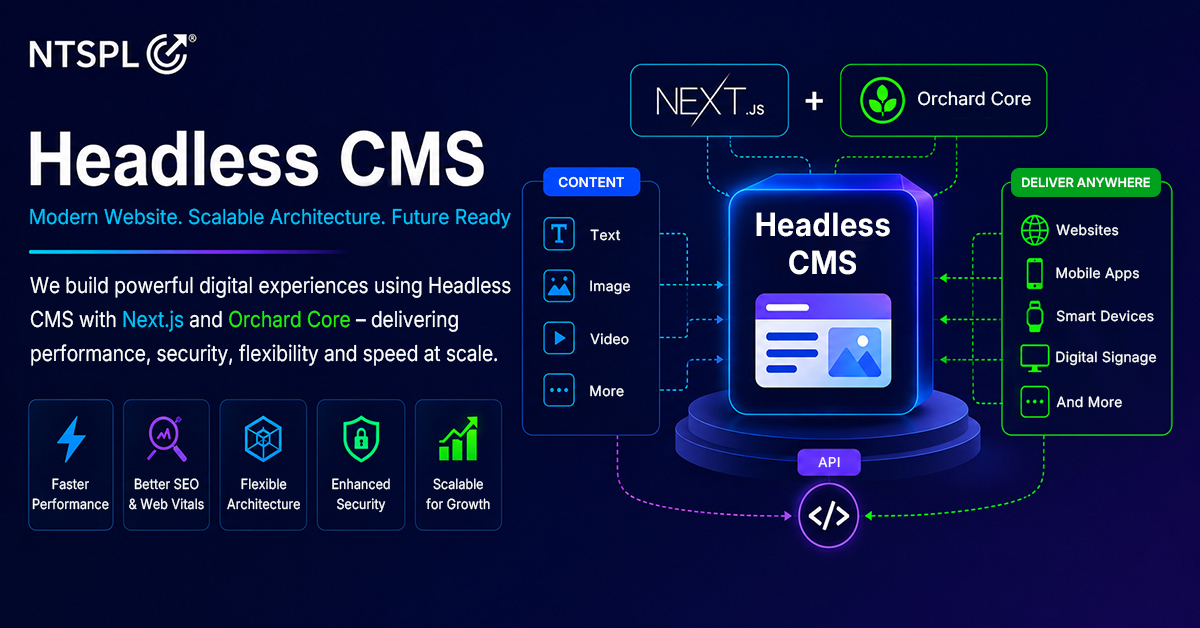
An Enterprise Headless CMS on .NET Core is a modern content management platform that separates the content-management backend from the frontend presentation layer. It enables organizations to create structured content centrally and deliver it securely through APIs to websites, mobile applications, employee portals and other digital channels.
Unlike a traditional CMS, where content, templates and presentation are closely connected, an Enterprise Headless CMS allows the CMS, APIs, frontend, search, cache and media-delivery infrastructure to operate and scale independently.
This architecture is particularly valuable for Government departments, public-sector undertakings, mining companies, manufacturing enterprises, utilities and large corporate groups managing complex digital ecosystems.
A well-planned Headless CMS can support:
- Multiple websites, brands and business units
- Multilingual content publishing
- Structured content-approval workflows
- Role-based access control
- Content versioning and rollback
- Complete audit trails
- Enterprise security controls
- GIGW and accessibility requirements
- API-first integrations
- Search Engine Optimization
- High-traffic scalability
- Large-scale content migration
- Long-term platform reuse
However, Headless CMS should not be positioned as a universal replacement for every traditional CMS.
The correct platform decision must consider the organization’s traffic, publishing workflow, security requirements, number of websites, integration needs, migration scope, operational capabilities and long-term total cost of ownership.
At Nexus Technoware Solution Pvt. Ltd. (NTSPL), our approach to ASP.NET Core Headless CMS development focuses on creating a reusable enterprise framework that can be configured for multiple organizations instead of rebuilding an entirely new CMS for every project.
What Is an Enterprise Headless CMS?
An Enterprise Headless CMS is a content management platform in which the content repository and publishing system operate separately from the website’s frontend.
Content editors use the CMS to create, review, approve, schedule and publish structured content. Once approved, the content is delivered through secure APIs to one or more digital experiences.
A Headless CMS can deliver the same governed content to:
- Corporate websites
- Government portals
- Mobile applications
- Employee intranets
- Customer portals
- Regional websites
- Business-unit websites
- Digital kiosks
- Search applications
- Future AI-powered interfaces
The term “headless” means that the CMS is not restricted to one fixed frontend or presentation technology.
Organizations can use Next.js, React, Angular or another suitable frontend framework while continuing to manage content through one centralized and governed platform. This API-based separation gives organizations greater flexibility to modernize the frontend without repeatedly replacing the complete content-management backend.
Why Are Enterprises Moving Beyond Traditional CMS Platforms?
Traditional CMS platforms remain suitable for many small and straightforward websites. They can provide familiar publishing controls, shorter implementation timelines and lower initial complexity.
However, enterprise organizations often require more than basic page editing.
They may need to manage:
- Several websites from one platform
- Different approval workflows for different departments
- Content in English, Hindi, Odia and other regional languages
- Large media and document repositories
- Integration with ERP, HRMS, CRM and other business applications
- High traffic during important announcements
- Security monitoring and auditable publishing
- Accessibility and GIGW requirements
- Mobile applications and additional digital channels
- Large-scale migration from legacy websites
When these requirements increase, a tightly coupled platform can become difficult to scale, govern and reuse. A scalable Headless CMS allows the organization to manage content centrally while independently controlling its frontend, API, search, security, cache and infrastructure layers.
Traditional CMS vs Headless CMS
The decision between a Traditional CMS vs Headless CMS should be based on the organization’s business and technical requirements.
Decision Area |
Traditional CMS |
Enterprise Headless CMS |
| Architecture | Content and presentation are closely connected | CMS, APIs and frontend operate independently |
| Content management | Suitable for rapid page-based publishing | Structured content with reusable components |
| Scalability | The application stack is generally scaled together | Frontend, API, cache, search and media can scale independently |
| Multi-channel delivery | Additional customization may be required | Content can be delivered to multiple channels through APIs |
| Multisite management | Separate instances or customization may be needed | Multiple websites can share one governed CMS platform |
| Editorial workflow | Suitable for simpler publishing processes | Supports author, reviewer, approver and publisher workflows |
| Security | Security depends on the platform, plugins and implementation | Supports defence-in-depth security and protected APIs |
| Platform reuse | Often implemented for one website | Can be reused across websites, brands and organizations |
| Best fit | Smaller websites with straightforward requirements | Government, PSU and complex enterprise digital ecosystems |
A traditional CMS may be the correct choice when an organization requires a small website, has relatively low traffic, needs a basic content model and has limited integration requirements.
A Headless CMS becomes more relevant when an organization requires multiple channels, advanced workflows, higher scalability, multilingual publishing, large-scale migration or long-term platform reuse.
How Does a Headless CMS Architecture Work?
A modern Headless CMS architecture generally contains six connected layers.
Digital channels
These are the platforms through which users consume published content.
They may include:
- Websites
- Mobile applications
- Customer portals
- Employee portals
- Digital displays
- Search interfaces
- Future communication channels
Edge and delivery layer
The edge layer improves security, performance and availability.
It may include:
- Domain Name System management
- Content Delivery Network
- Web Application Firewall
- DDoS protection
- TLS certificates
- Edge caching
- Traffic routing
Frontend experience layer
The frontend can be developed independently using:
- Next.js
- React
- Angular
- Server-Side Rendering
- Static Site Generation
- Incremental revalidation
- A reusable enterprise design system
API and CMS layer
This layer manages content, workflow, permissions and content delivery.
It may include:
- ASP.NET Core APIs
- Headless CMS
- API gateway
- Content workflow
- Role-based access control
- Authentication and authorization
- Publishing rules
- Enterprise integrations
Data and search layer
The data layer manages structured information, media, caching and search.
It may include:
- SQL Server
- Redis distributed cache
- Enterprise search
- Object storage
- Media repository
- Content indexes
Operations layer
This layer supports the platform after deployment through:
- CI/CD pipelines
- Application monitoring
- Centralized logging
- Security monitoring
- Backup and recovery
- Disaster-recovery planning
- SSL-expiry alerts
- Broken-link monitoring
- Content-expiry alerts
- Performance monitoring
This separation allows each part of the platform to be secured, maintained and scaled according to its specific requirements.
Why Build a Headless CMS on .NET Core?
ASP.NET Core provides a strong foundation for building modular, API-driven and enterprise-grade digital applications.
It is especially suitable for organizations that already use:
- Microsoft technology environments
- SQL Server
- Microsoft Azure
- Active Directory
- Microsoft Entra ID
- Enterprise APIs
- ERP systems
- HRMS platforms
- Existing .NET applications
A reusable .NET-based CMS framework can include standard modules for:
- Structured content types
- Editorial workflows
- Role-based permissions
- Versioning and audit trails
- SEO validation
- GIGW-focused controls
- Multilingual publishing
- Multisite management
- Content migration
- Enterprise search
- Third-party integrations
- Performance monitoring
This reduces the need to recreate the same enterprise capabilities for every new project.
Through custom Headless CMS development, organizations can configure approved components, publishing workflows, content structures and integrations according to their individual business requirements.
Evaluating Orchard Core for Enterprise CMS Development
Several .NET CMS options can be assessed, including Orchard Core, Squidex, Piranha CMS and a fully custom ASP.NET Core platform.
An Orchard Core Headless CMS can be considered for an enterprise proof of concept because it provides a modular foundation for structured content, permissions, workflows, localization and multitenancy.
However, the platform should not be selected only by reviewing its feature list.
A working proof of concept should validate:
- Content-editor usability
- API performance
- Workflow flexibility
- Role-based permissions
- Security integration
- Multilingual capabilities
- Multisite configuration
- Search functionality
- Upgrade management
- Content migration
- Operational support
- Long-term platform reuse
The right platform must remain manageable for editors, administrators, developers, security teams and infrastructure teams.
API-First CMS Development for Multiple Digital Channels
API-first CMS development treats APIs as a core part of the platform instead of adding them after the CMS has been developed. The CMS stores structured content and makes approved information available through governed APIs.
This allows the same content to be displayed across:
- Corporate websites
- Mobile applications
- Employee portals
- Business-unit websites
- Digital kiosks
- Search platforms
- Partner applications
For example, one approved leadership profile can be displayed on a corporate website, a subsidiary website, an employee portal and a mobile application without maintaining four separate copies. API-first architecture also makes it easier to integrate the CMS with ERP, HRMS, CRM, document-management and analytics platforms.
Enterprise Scalability: Design for Peak Traffic
Enterprise websites should be designed for peak demand, not only average daily traffic. Government announcements, tender publications, recruitment notices, examination results, investor updates and corporate news can produce sudden increases in visitors.
A scalable architecture may distribute traffic through:
- CDN and edge caching
- Web Application Firewall
- Load balancing
- Multiple frontend instances
- Stateless API services
- Distributed caching
- Indexed databases
- Dedicated search services
- Object storage for documents and media
The frontend, CMS, API, search, cache and media layers can be scaled independently according to actual demand. This prevents an organization from increasing the capacity of the entire platform when only one component requires additional resources.
Does a Headless CMS Improve Website Performance?
A Headless CMS can support improved website performance, but performance is not automatic. The result depends on frontend implementation, infrastructure, content, caching, APIs, media optimization and continuous monitoring. A secure Headless CMS can use different rendering models based on the type of content.
Static Site Generation
Stable pages can be generated in advance and delivered through a CDN with minimal load on the origin server.
This approach may be suitable for:
- About pages
- Corporate profiles
- Service information
- Policy pages
- Leadership profiles
- Archived publications
Server-Side Rendering
Server-Side Rendering can be used for pages requiring request-time information or controlled personalization.
It may support:
- Dynamic search pages
- Frequently changing listings
- Context-specific information
- Secure portal experiences
Incremental revalidation
Incremental revalidation can update selected pages periodically without rebuilding the entire website.
This creates a balance between publishing speed and edge-level performance.
Organizations should measure:
- Largest Contentful Paint
- Interaction to Next Paint
- Cumulative Layout Shift
- Time to First Byte
- API latency
- Search latency
- Error rate
- Cache hit ratio
- Origin-server load
Performance budgets should be defined before production and monitored after launch.
Enterprise Security Requires Defence in Depth
A Web Application Firewall or endpoint-protection solution cannot independently protect every layer of an enterprise platform. A secure enterprise CMS requires several connected controls.
TLS and HTTPS
TLS protects information while it travels between the user, edge infrastructure and origin application.
Enterprise deployments should use HTTPS across the complete communication path, including the connection between the WAF and origin environment.
Important controls include:
- TLS 1.2 or TLS 1.3
- Secure cipher policies
- HSTS
- Certificate-expiry monitoring
- Controlled certificate-renewal processes
Application and API security
Important application-security controls may include:
- Secure coding standards
- OAuth or JWT authentication
- Strong authorization
- Role-based access control
- Multi-factor authentication
- Single sign-on
- CORS restrictions
- API rate limiting
- Input validation
- Payload-schema validation
- Secure secrets management
- Centralized security logging
- SAST and SCA checks
- VAPT before production
- Patch management
- Backup and disaster recovery
Public content APIs should be separated from protected CMS-management APIs.
Security must be treated as an architectural, development and operational responsibility, not as a feature added immediately before deployment.
Does a Headless CMS Guarantee GIGW Compliance?
No. Implementing a Headless CMS does not automatically make a Government website compliant with the Guidelines for Indian Government Websites.
Organizations searching for GIGW-compliant CMS development should assess the complete website ecosystem rather than relying only on the CMS platform.
GIGW readiness requires coordinated implementation across:
- Architecture
- Application development
- Website accessibility
- Content governance
- Security
- Search
- Metadata
- Multilingual content
- Monitoring
- Documentation
- Audit evidence
A reusable compliance framework may include:
- Accessibility validation
- HTTPS and security checks
- Metadata requirements
- Search configuration
- Responsive-design testing
- Multilingual support
- Content ownership
- Review and expiry controls
- Broken-link monitoring
- Audit records
- Project-level checklists
- Evidence documentation
Compliance should be continuously measured instead of being reviewed only before the website is launched.
Content Management Without Routine Developer Dependency
Enterprise governance should not make regular content publishing unnecessarily complicated. Non-technical editors should be able to manage routine updates independently, while developers handle integrations, platform enhancements and governed components.
The CMS may provide structured content types for:
- Pages
- News
- Blogs
- Tenders
- Notices
- Events
- Careers
- FAQs
- Leadership profiles
- Documents
- Galleries
- Videos
Editors should also be able to manage:
- Navigation menus
- Footer information
- Media metadata
- Content scheduling
- Page previews
- Expiry
- Archiving
- Unpublishing
- SEO information
- Accessibility information
This creates an editorial experience comparable to familiar CMS platforms while maintaining enterprise-level governance.
Component-Based Page Building
A component-based page builder enables authorized editors to create pages using approved design elements without writing code.
Reusable components may include:
- Hero banners
- Text-and-image sections
- Cards
- Statistics
- Accordions
- Tabs
- Galleries
- Download sections
- Videos
- Calls to action
- FAQs
- Timelines
- Leadership profiles
- Related content
Each component should follow the organization’s design system, accessibility standards, CMS schema and frontend-rendering rules. This gives editors flexibility without allowing inconsistent or uncontrolled page designs.
Structured Content Creates Reusable Digital Assets
In a Headless CMS, information is stored according to its meaning rather than only as a complete webpage.
For example, a leadership profile can be maintained as one governed content record and displayed on:
- The corporate leadership page
- A business-unit website
- A news article
- A mobile application
- An employee portal
When the original record is updated and approved, the change can appear across every connected channel.
Structured content also supports:
- Categories
- Tags
- Departments
- Content relationships
- Required fields
- Ownership
- ALT text
- Media lifecycle
- Language variants
- Reusable references
This transforms the CMS from a page-editing tool into an enterprise content management platform.
SEO Should Be a Core CMS Capability
SEO should not depend entirely on editors manually remembering every requirement.
An enterprise CMS should provide controlled fields and automatic validation for:
- SEO titles
- Meta descriptions
- URL slugs
- Canonical URLs
- Index and noindex settings
- Open Graph information
- Heading hierarchy
- Image ALT text
- Breadcrumbs
- Structured data
- XML sitemaps
- Robots.txt
- Hreflang
- Redirects
An SEO Health Score can identify issues before content is published.
For example:
- A missing canonical URL may be treated as a critical issue.
- Missing ALT text may generate a warning.
- An invalid robots directive may block publication.
- An excessively long meta description may require correction.
- Incorrect heading hierarchy may produce an editorial warning.
The objective is not to replace SEO professionals. It is to convert important SEO practices into consistent and measurable publishing controls.
AI-Assisted SEO Must Remain Human-Governed
Artificial Intelligence can help editors generate suggestions for:
- SEO titles
- Meta descriptions
- Keywords
- Image ALT text
- FAQs
- Structured data
- Internal links
- Readability
- Potential duplicate content
However, AI-generated recommendations should not be published automatically.
A responsible publishing process should follow these stages:
- The author creates or updates the content.
- Deterministic SEO rules validate essential requirements.
- AI provides optional recommendations.
- An authorized person reviews and edits the suggestions.
- Approved content enters the publishing workflow.
- The final governed version is published.
Human review remains necessary for accuracy, compliance, brand consistency and accountability.
Workflow, Versioning and Auditability
Large organizations may require several people to participate in the publishing process.
A structured content workflow may include:
Author → Reviewer → Approver → Publisher
Every transition should be permission-controlled and recorded.
The CMS should capture:
- Who created the content
- Who reviewed it
- Who approved or rejected it
- Who published it
- The date and time of each action
- Comments and rejection reasons
- Previous and updated values
- Publication and expiry history
- Archived versions
Versioning allows authorized users to compare changes and restore an earlier approved version when necessary.
The governance objective is clear: every material content change should be explainable, reproducible and reversible.
Multisite CMS Development for Multiple Digital Properties
Large organizations may operate separate websites for:
- Corporate communication
- Business units
- Subsidiaries
- Regional operations
- Products
- Campaigns
- Investor relations
- Careers
- Sustainability reporting
Through multisite CMS development, these websites can share one enterprise platform while maintaining separate:
- Domains
- Branding
- Navigation
- Content ownership
- Permissions
- Workflows
- Language settings
- Publishing schedules
Common content types, design components, security controls and SEO rules can be reused across the organization.
This provides centralized governance without removing the flexibility required by individual websites and business units.
Multilingual CMS Development
Creating independent copies of every page for every language can cause duplication, incomplete translations and inconsistent updates.
Through multilingual CMS development, language variants can be connected to one canonical content entity.
The platform may support:
- English
- Hindi
- Odia
- Other regional languages
Each language version should have its own:
- SEO title
- Meta description
- URL
- Structured data
- Hreflang information
- Review status
- Publishing status
Menus, labels, categories, reusable components and search indexes should also support the selected languages.
Translation completeness and approval should become part of the publishing workflow.
Can WordPress Be Migrated to a Headless CMS?
Yes. WordPress content can be migrated to a new Headless CMS, but the process requires more than copying the database.
Professional WordPress to Headless CMS migration services should extract, clean, transform, map and validate content against the new structured content model.
The migration process may include:
- Source discovery
- Content extraction
- HTML and data transformation
- Source-to-target mapping
- Media migration
- Content import
- Link and SEO validation
- Error reconciliation
- Retry processing
- Migration reporting
Content may be extracted through:
- WordPress REST API
- WordPress export files
- Database access
- Media repositories
Important URLs should either be preserved or mapped through appropriate 301 redirects.
This helps protect user journeys, backlinks and existing search visibility during the migration.
Migrating From a Custom CMS
Custom platforms may store information in SQL Server, MySQL, REST APIs, XML, JSON, CSV or customer-specific formats.
Professional Headless CMS migration services should include:
- Source-system assessment
- Data extraction connectors
- Content mapping
- HTML cleanup
- Media processing
- Metadata migration
- Relationship mapping
- Import validation
- Record reconciliation
- Error reporting
Migration is a content-transformation exercise rather than a direct database copy.
A page title, body, featured image and permalink may need to be transformed into separate structured fields, components, media references and redirects.
Search, DevSecOps and Production Operations
An enterprise CMS requires a search architecture that matches the website’s size and complexity.
Smaller websites may use CMS-native, SQL-based or Lucene search. Larger platforms may require Elasticsearch, OpenSearch or another dedicated search service.
A reusable search abstraction can provide a consistent API while allowing the underlying search technology to change according to the project.
A DevSecOps pipeline may follow this process:
Code Commit → Code Review → Security Testing → Build → VAPT → Deployment → Monitoring
Production monitoring should cover:
- Application availability
- API errors
- Search performance
- Infrastructure utilization
- Certificate expiry
- Backup failure
- Broken links
- Content expiry
- Security events
Organizations should also define their Recovery Point Objective and Recovery Time Objective, test backups and conduct disaster-recovery drills.
Understanding CAPEX, OPEX and Long-Term TCO
A Headless CMS may require a higher initial investment than a basic traditional website because it includes architecture, APIs, frontend development, workflow, security, integrations and operational capabilities.
Its long-term business case becomes stronger when the framework is reused across multiple websites or enterprise projects.
A three-to-five-year TCO assessment should include:
- Initial development
- Frontend implementation
- CMS configuration
- Content migration
- Integrations
- Cloud infrastructure
- CDN
- Search
- Storage
- Security testing
- Monitoring
- Backup
- Disaster recovery
- DevOps
- Annual maintenance
- Enhancements
- Version upgrades
- Scaling
- Support
Headless CMS is not automatically less expensive.
Its economic value improves when reusable components, shared integrations, standardized deployments and centralized governance reduce the incremental effort required for future implementations.
A Practical 30/60/90-Day Implementation Roadmap
First 30 days: Research and proof of concept
The initial phase should include:
- Platform comparison
- Reference architecture
- Security framework
- SEO framework
- GIGW approach
- Basic CMS proof of concept
- Sample WordPress migration
- Technical-risk identification
First 60 days: Functional pilot
The next phase may deliver:
- Working .NET CMS
- Modern frontend
- Structured content types
- Workflow and role-based access
- SEO controls
- Multilingual publishing
- Migration utility prototype
- Performance baseline
First 90 days: Production-ready framework
The final phase can focus on:
- Enterprise reference architecture
- Reusable component library
- Migration engine
- DevSecOps pipeline
- Monitoring
- Backup and disaster recovery
- Technical documentation
- Implementation standards
- Commercial delivery model
Every stage should produce measurable evidence instead of only reporting activity or completion percentages.
What Should a Headless CMS Proof of Concept Demonstrate?
A useful proof of concept should demonstrate a complete content journey.
Stakeholders should be able to see:
- A non-technical editor creating a page
- The page being assembled with approved components
- SEO information being added and validated
- Content being submitted for review
- An authorized user approving the content
- The content being delivered through an API
- The approved page appearing on the frontend
- Cached content being updated
- An earlier version being restored
- Sample WordPress content being migrated
- A migration-reconciliation report being generated
The platform should then be assessed against:
- Editor experience
- Workflow and permissions
- API performance
- Scalability
- Security
- SEO
- GIGW readiness
- Migration success
- Multisite support
- Multilingual support
- Production operations
- Total cost of ownership
Which Organizations Can Benefit From Headless CMS?
A Headless CMS for Government and PSU organizations can support accessibility, multilingual communication, security, structured approvals and auditable content publishing.
The architecture can also benefit:
- Mining companies
- Manufacturing enterprises
- Utility providers
- Large corporate groups
- Healthcare organizations
- Educational institutions
- Multi-brand businesses
- Multi-location enterprises
Mining and manufacturing organizations can connect corporate websites, sustainability information, recruitment portals, employee systems and business applications.
Large enterprises can reuse structured content across several brands, regions, websites and digital channels.
Common Headless CMS Mistakes to Avoid
Organizations should avoid:
- Treating Headless CMS as the correct choice for every website
- Selecting a platform without building a working proof of concept
- Evaluating only development features
- Ignoring the editor experience
- Building unstructured content
- Allowing uncontrolled page-design flexibility
- Treating a WAF as complete website security
- Ignoring API authorization and rate limiting
- Assuming that Headless CMS automatically provides GIGW compliance
- Publishing AI-generated SEO content without human review
- Migrating databases without transforming the content
- Changing important URLs without redirect planning
- Ignoring versioning and audit requirements
- Testing only average traffic
- Underestimating backup and disaster recovery
- Comparing costs without considering platform reuse
- Building project-specific modules that cannot be reused
Avoiding these mistakes helps organizations develop a platform that remains secure, scalable and manageable after launch.
How NTSPL Supports Enterprise Headless CMS Development
Organizations searching for a reliable Headless CMS development company in India require more than a CMS installation.
They need a technology partner capable of understanding enterprise architecture, content governance, security, migration, integrations and long-term operations.
Nexus Technoware Solution Pvt. Ltd. (NTSPL) provides Enterprise Headless CMS development services for Government, PSU, mining, manufacturing and large enterprise organizations.
Our Headless CMS development services can cover:
Consulting and architecture
- Business and technical requirement assessment
- Traditional CMS and Headless CMS evaluation
- Platform selection
- Reference architecture
- Proof-of-concept development
- Implementation roadmap
- Total cost of ownership assessment
Custom development
- Custom Headless CMS development
- ASP.NET Core APIs
- Next.js, React or Angular frontend
- API gateway
- Structured content models
- Reusable component libraries
- Enterprise integrations
Content governance
- Author, reviewer, approver and publisher workflows
- Role-based permissions
- Versioning
- Rollback
- Audit trails
- Content scheduling
- Expiry and archive controls
Multisite and multilingual capabilities
- Multiple website management
- Shared content
- Site-specific permissions
- Multilingual content variants
- Translation workflows
- Language-specific SEO metadata
Security and operations
- TLS and WAF integration
- API security
- Secure coding
- DevSecOps
- VAPT support
- Monitoring
- Backup
- Disaster recovery
Content migration
- WordPress migration
- Custom CMS migration
- Source connectors
- Data transformation
- Media migration
- SEO-safe URL mapping
- Migration validation
- Reconciliation reports
The objective is not to build another isolated website. It is to create a reusable digital platform that can be configured, governed and deployed across multiple enterprise environments.
FAQ:
1) Is a Headless CMS better than WordPress?
Not in every situation. WordPress may be suitable for smaller websites with straightforward publishing requirements. A Headless CMS is more suitable when an organization requires advanced scalability, multiple digital channels, structured workflows, multisite management, integrations or long-term reuse.
2) Why use .NET Core for Headless CMS development?
ASP.NET Core provides a modular and API-friendly foundation that integrates well with Microsoft environments, SQL Server, Azure, enterprise identity platforms and existing business applications.
3) Can non-technical editors manage a Headless CMS?
Yes. A properly designed CMS can provide user-friendly content forms, previews, media management and component-based page building. Editors can manage routine content while developers control platform architecture, integrations and governed components.
4) Can a Headless CMS manage multiple websites?
Yes. A multisite implementation can manage multiple domains, brands and digital properties through one centralized platform while retaining separate permissions, workflows, designs and publishing schedules.
5) Can a Headless CMS support multilingual content?
Yes. The platform can maintain connected language variants with separate URLs, metadata, structured data, hreflang information and approval workflows.
6) Does Headless CMS automatically ensure GIGW compliance?
No. GIGW compliance depends on the complete implementation, including accessibility, content governance, metadata, security, search, multilingual publishing, monitoring and evidence management.
7) Can an existing WordPress website be migrated?
Yes. WordPress content can be extracted through APIs, export files, databases and media repositories. The content must then be transformed, mapped and validated before being imported into the new CMS.
8) Is Headless CMS more expensive than traditional CMS?
It may require a higher initial investment. However, its long-term value can improve when the framework, integrations and components are reused across multiple websites and business units.
9) How should an organization start its Headless CMS implementation?
The recommended starting point is a focused proof of concept covering content creation, page building, workflow, SEO validation, API delivery, frontend rendering, rollback and sample migration.
10) How do I choose a Headless CMS development company in India?
Evaluate the provider’s experience in enterprise architecture, .NET development, frontend frameworks, security, migration, content governance, DevSecOps, SEO and post-launch support. The provider should demonstrate a working solution instead of relying only on feature presentations.
Build Once, Reuse Across Enterprises and Govern at Scale
Enterprise websites must support more than content publishing. They require scalability, security, accessibility, workflow, auditability, multilingual communication, search visibility, migration readiness and operational resilience.
A reusable Enterprise Headless CMS on .NET Core can help organizations transform disconnected websites into a governed digital platform supporting both current requirements and future channels.
The correct approach is not to select Headless CMS simply because it is a popular technology. Organizations should first determine whether the architecture solves measurable business, technical and operational problems.
When supported by a working proof of concept, reusable components, enterprise security and a practical implementation roadmap, Headless CMS can become a long-term digital asset rather than another isolated website project.
Looking for a Headless CMS Development Company in India?
NTSPL can help your organization plan, develop, migrate and implement a secure, scalable and reusable Headless CMS powered by .NET technologies.
Our services cover Headless CMS consulting, platform development, frontend implementation, WordPress migration, multisite publishing, multilingual content, API integration, security and enterprise support.
Book a Consultation: +91 8260003333
Email: info@ntspl.co.in
Website: www.ntspl.co.in
Explore Our Website Development Services: www.ntspl.co.in/services/web-development/
About NTSPL: Nexus Technoware Solution Pvt. Ltd. is a technology consulting and software development company specializing in enterprise software solutions, corporate website development, Headless CMS development, Odoo ERP implementation, HRMS, AI-powered automation, cloud solutions, digital transformation and custom application development. NTSPL helps Government, PSU and enterprise organizations build secure, scalable and future-ready digital platforms.